What it is
arc is a personal CLI for day-to-day maintenance across my Arch Linux and macOS machines: system updates, package hygiene, hardware info, AI tool usage tracking, and shared config sync across AI coding tools. One binary instead of a growing pile of shell aliases and one-off scripts.
It uses platform-native backends under a shared command surface: pacman, yay, systemd, and Linux hardware tools on Arch; Homebrew, pmset, system_profiler, and sysctl on macOS.
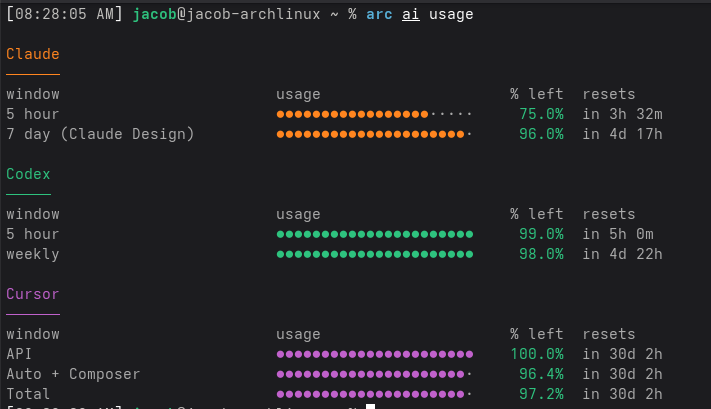
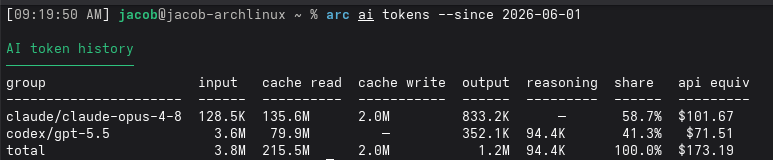
The AI tooling has grown into two related views: arc ai usage for live quota windows across Claude Code, Codex, and Cursor, and arc ai tokens for historical local token usage with API-equivalent pricing.
What it does
| Command area | Examples |
|---|---|
| Updates | arc update system, arc update self, arc update uv |
| Cleanup | arc clean --orphans-only |
| Packages | arc packages --top 25 --json, arc search neovim, arc installed --aur-only (Arch-only) |
| System | arc info, arc parts, arc sleep |
| AI | arc ai usage, arc ai tokens |
| Shared tools | arc skills sync, arc rules sync |
The primary use case is updating system packages + libraries. On Arch, package and system commands use pacman, yay, paccache, and systemd. On macOS, the same command surface uses Homebrew, pmset, system_profiler, and sysctl where appropriate. arc update system, arc clean, arc packages, arc installed, arc parts, and arc sleep dispatch to platform-specific implementations.
I’ve also included functionality to manage AI tooling and shared configs across providers. arc ai usage pulls live quota windows from Claude Code, Codex, and Cursor APIs to show remaining quota and reset times in one place, while arc ai tokens scans local session logs to estimate historical token usage and API-equivalent costs.
The arc ai skills commands sync a single canonical set of AI tool configs to Claude, Codex, Cursor, and OpenCode, so I can edit a skill once and have it reflected everywhere instead of maintaining four near-identical copies.
Why I built it
The process of running system updates, cleaning up old packages / caches, or checking my AI tool usage across multiple platforms became cumbersome for me. I wanted to build a single interface to standardize and simplify these tasks whether I’m on my Arch desktop or my personal or work Macbook.
# Before
sudo pacman -Syu && yay -Syu --aur && sudo paccache -rv
aws sts get-caller-identity && aws iam create-access-key --user-name "$USER" && aws configure
# no single place to check ai tool usage or see comparable token spend

# After
arc update system
arc aws rotate-keys
arc ai usage
arc ai tokens --since 2026-01-01
Tech stack
- Language: Go
- CLI framework: Cobra
- Distribution: GitHub Releases
- Targets: Arch Linux and macOS
What I learned
- Go is the right choice for these CLI apps, it compiles into a single binary with no runtime dependencies and has great cross-compilation support.
- Self-update functionality is a must-have, not a nice-to-have. Shipping
arc update selfmeaningfully reduced friction for a tool I touch and update consistently across multiple devices. - Centralizing AI tool configs was the highest-leverage feature. I can manage a single canonical set of skills across Claude, Codex, Cursor, and OpenCode, monitor live quota, and sanity-check historical token spend from one place.