What it is
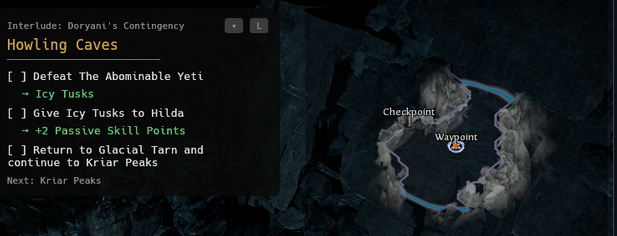
rsexile is a desktop GUI overlay for Path of Exile 2. It runs a small always-on-top window alongside the game and surfaces campaign routing and quest information to speed up repeat playthroughs. The app is built in Rust with egui/eframe and distributed via GitHub Releases to Linux and Windows users (mainly myself and a few friends).
This was fully vibe coded. I’m still early in my Rust journey, so the project exists because I had a concrete problem while playing Path of Exile 2, and this app does exactly what I need it to.
What it does
- Watches the Path of Exile 2 client log file with
notifyand parses zone and quest events out of it with a few regex patterns, so the overlay always reflects where I actually am in the campaign - Renders that state in a lightweight, always-on-top overlay window, so the routing and quest info I care about stays on screen without breaking flow
- Updates itself in place via
self_update, pulling the latest binary straight from GitHub Releases so I never have to think about distributing new versions by hand
Why I built it
Path of Exile 2 is an RPG with seasonal content releases, which means playing through the same campaign repeatedly. That gets time-consuming and repetitive, and I wanted to optimize each playthrough by keeping the right information in front of me instead of alt-tabbing to a wiki or guide. rsexile solves that and makes the grind more enjoyable.
I considered Python, Go, and Rust. Python was the first to go: it’s not easily distributable as a desktop app, since anyone using it would need a Python environment and the dependencies installed, which is a non-starter. With Go or Rust you compile a single binary and you’re done.
That left Go versus Rust, and the deciding factor was the GUI. The core of this app is an always-on-top, borderless, draggable overlay window, and Rust’s egui/eframe (rendering through glow/OpenGL via winit) handles that cleanly across platforms. Go’s GUI ecosystem — Fyne, Gio — is less mature for this kind of always-on-top overlay, and I’d have spent more time fighting the windowing layer than building the actual tool. I have more Go experience, but the app’s logic was simple enough that I was comfortable letting GUI fit drive the choice.
Path of Exile doesn’t have a public API or expose official game state for this kind of tool, but it does write a log file with all the info I need, so I can watch that log in real time and parse out the relevant events. It’s a bit hacky, but it works, and it’s how a lot of tools in the PoE community get their data.
Tech stack
| Area | Tools |
|---|---|
| Language | Rust |
| GUI | egui / eframe, rendering via glow + winit |
| Game state | notify (log file watching) |
| Config/state | serde / serde_json |
| Auto-update | self_update, from GitHub Releases |
| Distribution | GitHub Releases (Linux + Windows binaries) |
What I learned
- It’s fine to ship useful software in a language I’m still learning when the scope is contained, the tests are meaningful, and the release path is reliable.
- Rust was the pragmatic choice here because GUI fit mattered more than language comfort, and the moment you target a desktop GUI on more than one platform, the windowing layer is where the sharp edges live. On Linux I force the X11 backend, because Wayland doesn’t let clients set their own window position, which a draggable overlay depends on.
- Confidence comes as much from the engineering system around the app as from the code itself. Tests, a good local dev setup, CI/CD, and a repeatable release process keep the project maintainable even while Rust is still new to me.